Aurora Brand & Media Kit Full kit

Brand & Media Kit · November 2026

Everything you need to show Aurora at its best.

Official logos, colors, type and guidelines for our team, partners, funders and press. Take the whole kit, or just the file you need.

The mark

The hope of a new day.

Aurora is the goddess of the dawn. Every morning she rises to bring a new day, and with it, hope. Our mark shows her in profile, facing the sun as it rises, with the first red light of dawn breaking along the edge of the world.

Hope is what we bring to every nonprofit we serve: the belief that a mission can grow, and the steady, practical guidance that gets it there. The wordmark carries the mark as its o, so the dawn rises inside our name.

  • HopeEvery mission has a new day ahead of it.
  • GuidanceClear, honest advice from people who have done this before.
  • TrustSupporting Houston’s nonprofits since 2010.
02 · Icon

The Aurora mark

Use the mark on its own where space is tight or the name is already clear: profile pictures, app icons, favicons, stamps and seals. Below 48 px, switch to the small-size version.

Aurora app icon on Mist White
App icon
Aurora app icon on Deep Teal
App icon, teal
Favicons 48 · 32 · 16
App icons & faviconsZIP · 132 KB

03 · Space & size

Give it room

Keep clear space on every side equal to X, the height of the capital letters in GRANTS & CONSULTING. For the icon, keep a quarter of its width clear.

XXXX
Clear space = X on every side
¼¼¼¼
Icon clear space = ¼ of its width

Lockup minimum140 px wide on screen
1.25 in (32 mm) in print

Icon minimum24 px on screen
0.3 in (8 mm) in print

04 · Color

Teal waters, first light

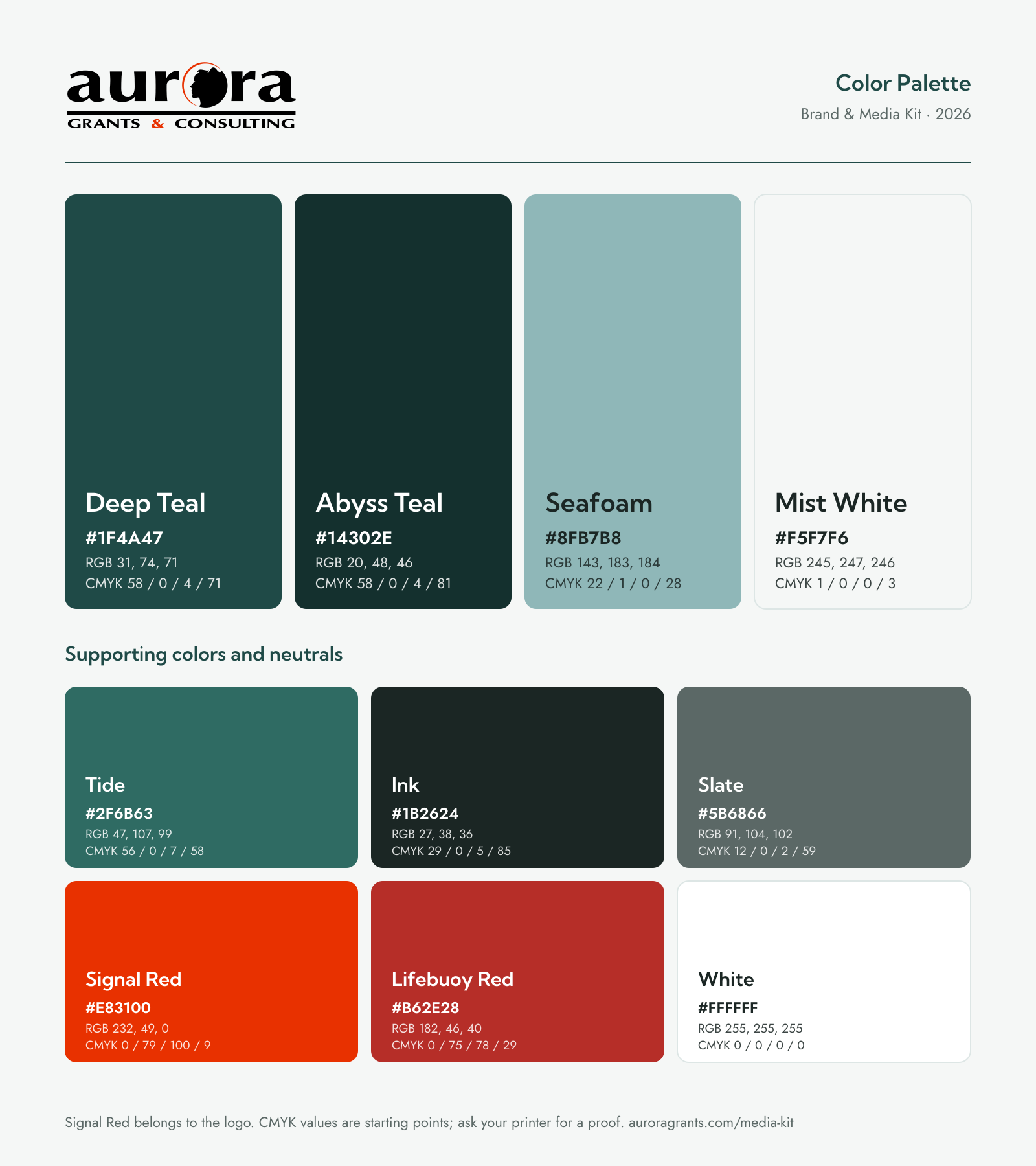
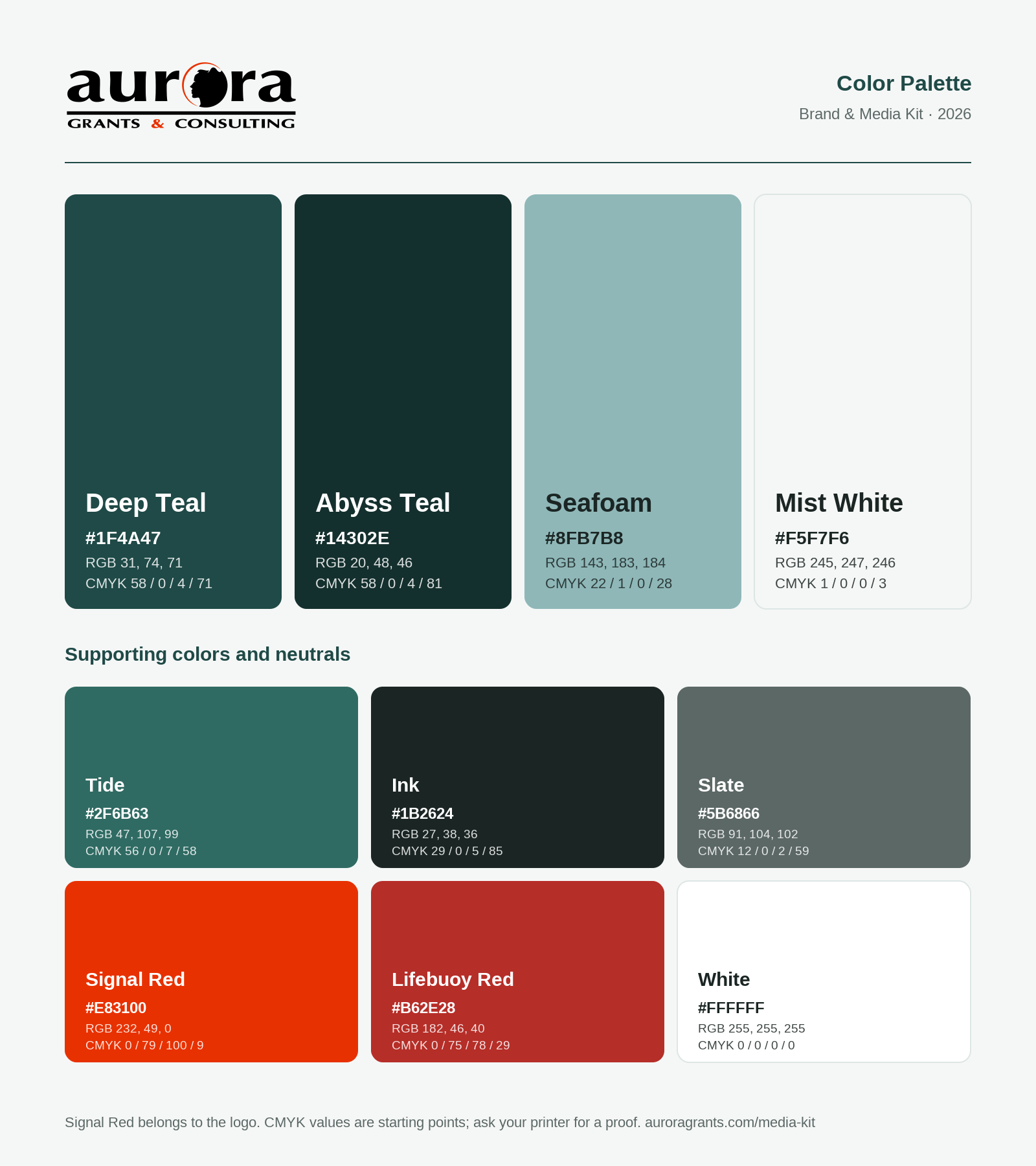
Cool, calm and confident. The teals carry the brand, Mist White gives it air, and Signal Red is the first light of dawn, so it stays in the logo. Tap any color to copy it.

Deep TealMist WhiteAbyss Seafoam

A balanced page: mostly Deep Teal and Mist White, Abyss Teal for depth, Seafoam for warmth, Tide for links, and red only in the logo.

  • Deep Teal Our signature color. Headlines, buttons, headers and large backgrounds.
  • Abyss Teal A deeper teal for hero areas, footers and dark mode. Rich on phones and OLED screens.
  • Seafoam The calm accent. Highlights, panels, and links and buttons on dark backgrounds.
  • Mist White The page ground, with a whisper of teal. Home for the full-color logo.
  • Tide Links, icons and outlines on light backgrounds.
  • Ink Body text. Softer than black, still crisp.
  • Slate Captions, labels and secondary text.
  • Signal Red The first light of dawn in the mark, and the ampersand. Logo only.
  • Lifebuoy Red Rare, small red text, such as errors and alerts.
  • White Space to breathe. Type on Deep Teal and Abyss Teal.

Readable pairings

Contrast against WCAG 2.2. AA is the minimum for body text.

  • AaWhite on Deep Teal9.9:1 · AAA
  • AaInk on Mist White14.5:1 · AAA
  • AaMist White on Abyss Teal13.1:1 · AAA
  • AaDeep Teal on Seafoam4.5:1 · AA
  • AaTide on Mist White5.7:1 · AA
  • AaSeafoam on Abyss Teal6.5:1 · AA
  • AaSlate on Mist White5.4:1 · AA
  • AaWhite on Tide6.2:1 · AA
  • AaLifebuoy Red on White6.2:1 · AA

For developers

:root {
  --aurora-deep-teal: #1F4A47;
  --aurora-abyss-teal: #14302E;
  --aurora-seafoam: #8FB7B8;
  --aurora-mist-white: #F5F7F6;
  --aurora-tide: #2F6B63;
  --aurora-ink: #1B2624;
  --aurora-slate: #5B6866;
  --aurora-signal-red: #E83100;
  --aurora-lifebuoy-red: #B62E28;
  --aurora-white: #FFFFFF;
}

05 · Type

Clear, warm, modern

Two free typefaces do all the work. Both are open source, so anyone can use them, in print or on screen.

Aa

Kumbh Sans

Headlines, titles and buttons · SemiBold 600, Bold 700

Helping nonprofits fulfill their mission

Get Kumbh Sans
Aa

Jost

Body text, captions and forms · Regular 400, Medium 500, Italic

Helping nonprofits fulfill their mission

Get Jost
Display · Kumbh Sans 600 · 56/60

Since 2010

Heading · Kumbh Sans 600 · 32/38

Grant writing that gets results

Eyebrow · Jost 600 · 13 · caps +16%

Board retreats & workshops

Body · Jost 400 · 18/30

We help nonprofits find the right funders, tell their story with clarity and build fundraising plans that last.

The logo lettering is custom artwork drawn from a classic chiseled capital. It isn't a font you can type with, so always use the logo files.

06 · Expression

Ways the brand can speak

Ideas for headers, slides, social posts and print. Big, calm type, generous space and one strong color at a time.

Our promise

Your mission deserves to be funded.

Since

2010

Helping Houston’s nonprofits fulfill their mission.

Nonprofit News

Six narrative templates every grant writer should keep close.

Free one-hour consultation

“You really go the extra mile. I am amazed at your dedication.”

Christine Holland, CEO, Rebuilding Together Houston

Grants · Strategy · Board retreats

07 · Rules

Do this. Never that.

A few simple rules keep the logo recognizable everywhere it appears.

Do

Full color on light
Reverse on Deep Teal
Deep Teal on Seafoam
Reverse on a darkened photo

Don’t

Don't stretch or squash it
Don't recolor the dawn arc
Don't rotate or tilt it
Don't add shadows, glows or outlines
Don't place it on low contrast
AURORA grants & consulting
Don't rearrange or retype it

08 · In use

The brand at work

How the pieces come together, from a business card and a handwritten note to a social post. Below, make your own email signature and business card.

Business card front: the reverse logo over a teal night sky with the first light of dawnBusiness card back: name, title, phone, email and the Aurora QR code
Business card, front and back · 3.5 × 2 in

auroragrants.com · Houston, Texas

Letterhead

Grant proposal

Building Futures: Youth Literacy Program

Prepared for the Community Foundation · 2027

Proposal cover

Hello, I’m

Your Name

Board Retreat 2027

Event badge
Stationery card front: the logo at the top, open space for a handwritten note, and a soft dawn horizonStationery card back: the Aurora mark under the dawn light with the words The hope of a new day
Stationery card for handwritten notes, front and back · 6.25 × 4.5 in · Print PDF

Email signature

Every email, on brand

Type your details, then copy the finished signature straight into Gmail, Outlook or Apple Mail. The banner carries the brand, so the rest stays simple.

Banner PNG
How to add it

Gmail: Settings, See all settings, Signature, Create new. Paste, then Save Changes at the bottom.

Outlook: Settings, Account, Signatures, New signature. Paste and Save.

Apple Mail: Settings, Signatures, add one, then paste. Untick “Always match my default message font”.

New message

To Program Officer

Subject Our proposal for the spring cycle

Thank you again for your time this week. Our full proposal is attached, and I’m glad to answer any questions.

Warm regards,

Linda Beeman, GPC
Founder & President
auroragrants.com  ·  Houston, Texas
Aurora Grants & Consulting. Supporting Houston’s nonprofits since 2010.

QR code

One scan to the website

Our QR code opens auroragrants.com. Use it on cards, flyers, event signs and slides.

Aurora QR code to auroragrants.com
  • Print it at least 0.75 in (2 cm) wide.
  • Keep the white space around it, and don’t stretch or recolor it.
  • Always test a printed proof with a phone before a full print run.

Business cards

Make your card, ready to print

Type your details and download a print-ready PDF: 3.5 × 2 in with a 0.125 in bleed, front and back. Send it to any printer.

Ask for 16 pt or heavier matte stock. The PDF is made at 600 dpi.

Card front

09 · Downloads

Every file, one place

SVG for web and apps, PDF for print and design software, PNG for slides, documents and social posts. Every PNG has a transparent background.

The complete brand kitEvery logo, icon, app icon and palette file with a quick-start guide ZIP · 5.1 MB
Logo lockups30 files
Aurora mark (icon)42 files
App icons and favicons14 files
Color palette8 files
QR code3 files
Print: cards and stationery7 files

Need something else?

For a format we don’t list, approval for a special use, or press and partnership questions, we’re glad to help.

Contact Aurora